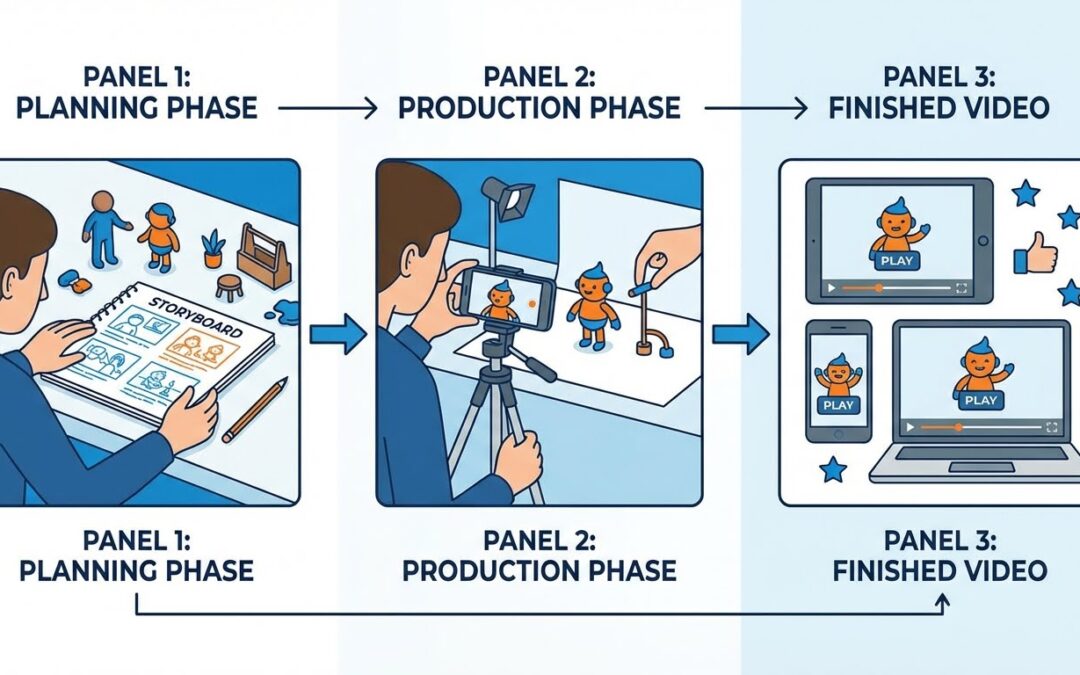
Stop-motion videos has come full circle. What started as a painstaking craft requiring countless hours of manual work is now experiencing a renaissance, powered by both traditional techniques and artificial intelligence. As we navigate through 2026, the landscape of stop-motion video creation is transforming in ways that would have seemed impossible just a few years ago.
Whether you’re a solo content creator, digital marketer, small business owner, or brand strategist, understanding stop-motion video creation has become essential. This comprehensive guide will walk you through everything you need to know about creating, optimizing, and leveraging stop-motion content in today’s digital landscape.
Contents
- 1 Table of Contents
- 2 The Stop-Motion Revolution: Why It Matters Now
- 3 The Science Behind Stop-Motion Engagement
- 4 Creating Stop-Motion Without AI: The Complete DIY Guide
- 5 Common Stop-Motion Mistakes and Solutions
- 6 AI-Powered Stop-Motion: The Modern Approach
- 7 The Hybrid Approach: Best of Both Worlds
- 8 Stop-Motion for Marketing: Industry Applications
- 9 Platform-Specific Stop-Motion Strategies
- 10 Monetization and ROI of Stop-Motion Content
- 11 Advanced Stop-Motion Techniques
- 12 Stop-Motion Content Calendar Strategy
- 13 Stop-Motion Analytics and Optimization
- 14 The Future of Stop-Motion: 2026 and Beyond
- 15 Common Questions About Stop-Motion Videos
- 16 Resource Library
- 17 Stop-Motion Content Checklist
- 18 Final Thoughts: Your Stop-Motion Journey
- 19 Take Action Today
Table of Contents
- The Stop-Motion Revolution: Why It Matters Now
- The Science Behind Stop-Motion Engagement
- Traditional Stop-Motion: Complete DIY Guide
- AI-Powered Stop-Motion: The Modern Approach
- Stop-Motion for Marketing: Industry Applications
- Platform-Specific Strategies
- Monetization and ROI
- Tools and Resources Comparison
- Future Trends and Predictions
The Stop-Motion Revolution: Why It Matters Now
The Authenticity Crisis in Digital Marketing
In an era dominated by polished, hyper-realistic content and AI-generated deepfakes, audiences have developed a sophisticated skepticism toward overly perfect digital content. According to recent social media engagement studies, users are 3.5x more likely to engage with content that feels authentic and human-made.
Stop-motion videos offer that imperfect, tactile quality that stands out in crowded social media feeds. The slightly jerky movements, the handcrafted aesthetic, the nostalgic charm—these elements create an emotional connection that smooth, algorithmically-generated content simply can’t replicate.
The Algorithm Advantage
Platforms like Instagram, TikTok, LinkedIn, and YouTube have noticed a significant pattern: stop-motion content consistently outperforms traditional video content in key metrics:
- Average watch time: 47% higher than standard video posts
- Engagement rate: 2.8x higher than static images
- Share rate: 3.2x more likely to be shared
- Comments: 65% more likely to generate conversation
Social media algorithms prioritize content that keeps users on the platform longer. Stop-motion’s unique visual appeal naturally generates this “scroll-stopping” power, making it algorithmically favorable across all major platforms.
The Nostalgia Factor
Stop-motion taps into powerful nostalgia. For millennials and Gen X, it recalls childhood memories of Gumby, Wallace and Gromit, and California Raisins commercials. For Gen Z, it represents a break from the constant stream of perfect, filtered content—it feels refreshingly real and intentional.
This emotional connection translates directly into brand recall and consumer trust, two metrics that are increasingly difficult to achieve in oversaturated digital markets.
The Science Behind Stop-Motion Engagement
Cognitive Processing and Visual Interest
Research in cognitive psychology reveals why stop-motion videos is so effective. The human brain is wired to detect motion and change. Stop-motion’s distinctive frame-by-frame movement pattern triggers what psychologists call “perceptual novelty”—our brains recognize it as different from typical video, causing us to pay closer attention.
Additionally, the visible “effort” in stop-motion content activates our appreciation for craftsmanship. Even when we know something is AI-generated, the stop-motion aesthetic signals intentionality and care, which builds brand credibility.
The Incompletion Principle
Stop-motion’s imperfect nature leverages the “incompletion principle”—a psychological phenomenon where our brains find incomplete or imperfect things more memorable and engaging than perfect ones. This is why hand-drawn elements, visible mistakes, and the characteristic “jittery” movement of stop-motion actually increase rather than decrease its effectiveness.
Emotional Resonance Through Texture
The tactile nature of traditional stop-motion—where you can almost “feel” the materials—creates deeper emotional resonance. Marketing research shows that content suggesting physical texture generates 43% stronger emotional responses than flat digital content, even when viewed on a screen.
Creating Stop-Motion Without AI: The Complete DIY Guide
While AI tools are revolutionary, you don’t need fancy software to create engaging stop-motion videos. All you need is a smartphone camera, patience, and a free editing app like InShot. Here’s your complete roadmap:
Equipment Checklist
Essential (Under $50):
- Smartphone or camera (any modern phone works perfectly)
- Tripod or phone mount (budget option: $15-25)
- Basic lighting (desk lamp or natural window light)
- Your subject (toys, objects, paper cutouts, clay, product samples)
- Free editing app: InShot, CapCut, or Stop Motion Studio
Optional Enhancement ($50-200):
- Ring light for consistent lighting ($30-60)
- Remote shutter for phone ($15-25)
- Green screen backdrop ($20-40)
- Additional props and materials
- External microphone for voiceover ($30-80)
Phase 1: Pre-Production Planning (30-60 minutes)
1. Storyboard Your Concept
Before touching your camera, sketch out your story frame by frame. You don’t need artistic skills—stick figures work perfectly. Map out:
- Opening scene
- Key movements and transitions
- Ending position
- Text or graphics placement
- Total estimated duration
Pro Tip: Start with 5-10 second videos for your first projects. A 10-second stop-motion video requires 120-240 photos—manageable for beginners but enough to learn the technique.
2. Choose Your Subject Wisely
Best subjects for beginners:
- LEGO figures or toys: Easy to pose, stable, recognizable
- Product demonstrations: Show features assembling themselves
- Paper cutouts: Simple but effective for explainer content
- Food items: Great for recipe content or restaurant marketing
- Office supplies: Pens writing messages, sticky notes arranging themselves
- Clay or Play-Doh: Maximum flexibility for character animation
Avoid for first attempts:
- Living subjects (pets, people) that won’t stay still
- Very small objects that are hard to reposition precisely
- Transparent or reflective materials that cause lighting issues
3. Set Up Your Shooting Space
Lighting is critical. Inconsistent lighting between frames creates distracting flicker. Follow these rules:
- Use consistent artificial light: Close curtains and use lamps. Natural light changes throughout the day.
- Position lights at 45-degree angles: One on each side of your subject to minimize harsh shadows.
- Avoid overhead lighting alone: Creates unflattering shadows that move as you work.
- Test your setup: Take 10 test shots, import to InShot, and check for lighting consistency.
Camera positioning:
- Mount phone on tripod at subject’s eye level (for characters) or 45-degree angle (for flat-lay shots)
- Ensure the entire movement area is visible in frame with extra space around edges
- Lock focus and exposure by tapping and holding on your phone screen
- Mark your tripod position with tape in case it gets bumped
Phase 2: Production – Shooting Your Frames (1-3 hours)
4. Camera Settings Configuration
iPhone users:
- Open Camera app
- Tap on your subject and hold until you see “AE/AF LOCK”
- Turn off Live Photo mode
- Set grid view for alignment reference
Android users:
- Open Camera app
- Tap Settings (gear icon)
- Enable Grid lines
- Set to Photo mode (not burst or continuous)
- Lock exposure if your phone allows it
5. The Shooting Process
This is where patience pays off:
Shot 1: Capture starting position. Take it from multiple angles if you’re unsure which will work best.
Movement increment: Move your subject 1-2 centimeters (about half an inch). For smooth motion, smaller is better.
Shot 2: Take another photo without touching the camera.
Repeat: Continue this process. Check your work every 20-30 frames by importing to your editing app.
Frame rate guidance:
- Smooth motion: 24 frames per second of final video (very time-intensive)
- Standard stop-motion feel: 12-15 frames per second (recommended for beginners)
- Stylized choppy motion: 8-10 frames per second (faster to create, distinct look)
Math breakdown: For a 10-second video at 12fps, you need 120 photos. At 1-2 minutes per photo (positioning + shooting), that’s 2-4 hours of shooting time.
6. Advanced Shooting Techniques
The replacement technique: For difficult animations like walking, create multiple slightly different versions of your subject’s legs/arms and swap them between shots.
Squash and stretch: Slightly compress or elongate your subject at impact points for more dynamic movement (works great with clay).
Anticipation: Move slightly backward before a big forward motion—this is a professional animation technique.
Easing: Make smaller movements at the start and end of an action, with larger movements in the middle for natural-looking acceleration and deceleration.
Phase 3: Post-Production with InShot (20-45 minutes)
7. Importing and Sequencing
Step-by-step in InShot:
- Download InShot from App Store or Google Play
- Open app and tap “Video”
- Tap “New” to create a project
- Select all photos from your shoot in sequential order
- Let InShot add them to the timeline
Organization tip: Name your photo files sequentially (001, 002, 003) before importing to ensure correct order.
8. Setting Frame Duration
This is THE most critical step for stop-motion:
- Tap anywhere on the timeline to select all frames
- Tap “Duration” at bottom menu
- Set duration to 0.1 seconds (for 10fps) or 0.083 seconds (for 12fps)
- Apply to all frames
Testing: Play your video. If motion looks too slow, decrease duration. If too fast or jittery, increase duration slightly.
9. Enhancing Your Video
Audio layering:
- Tap “Music” to add background tracks
- Choose upbeat, rhythmic music that matches your motion pace
- Adjust volume so music doesn’t overpower (60-70% is usually good)
- Add sound effects at key moments (use “FX” in InShot)
Text overlays:
- Tap “Text” to add captions
- Use bold, sans-serif fonts for readability
- Animate text to appear/disappear with your action
- Keep text on screen for at least 2-3 seconds
Color correction:
- Tap “Filter” to apply consistent color grading
- Subtle filters work best—avoid heavy filtering that looks unnatural
- “Vibrant” or “Bright” presets often work well for stop-motion
- Adjust brightness/contrast if needed to fix lighting inconsistencies
Transitions:
- Use sparingly in stop-motion (the motion itself is the effect)
- “None” or simple “Fade” between scenes works best
- Avoid flashy transitions that distract from your content
10. Export Settings
For maximum quality and platform compatibility:
- Resolution: 1080p (Full HD) – 4K if your phone supports it
- Frame rate: 30fps (InShot will handle the frame timing you set)
- Format: MP4 (most compatible)
- Bitrate: High (if option is available)
Platform-specific sizes:
- Instagram Feed/Reels: 1080×1080 (square) or 1080×1920 (vertical)
- TikTok: 1080×1920 (vertical)
- YouTube: 1920×1080 (horizontal)
- LinkedIn: 1920×1080 (horizontal) or 1080×1080 (square)
Common Stop-Motion Mistakes and Solutions
Mistake #1: Camera Movement
Problem: The camera shifts slightly between frames, causing jarring jumps.
Solution:
- Use a sturdy tripod, not a phone propped against books
- Don’t touch the camera between shots—use timer mode or remote shutter
- Mark your tripod’s position with tape
- Check alignment every 20 shots by comparing to your first frame
Mistake #2: Lighting Inconsistency
Problem: Flicker or color shifts between frames due to changing light.
Solution:
- Close all curtains and use only artificial light
- Avoid auto-white balance—lock it in camera settings
- Don’t shoot near windows or during sunrise/sunset hours
- If shooting takes multiple days, recreate exact lighting setup
Mistake #3: Movement Too Large
Problem: Jerky, unrealistic motion because subject moves too far between frames.
Solution:
- Move objects 1-2 cm maximum per frame
- For smooth motion, aim for 15-24 frames per second
- Use reference markers (tape dots) to guide consistent movement
- When in doubt, take MORE frames with smaller movements
Mistake #4: Subject Falls or Shifts
Problem: Objects falling over or drifting from their position.
Solution:
- Use museum putty or sticky tack to secure objects
- Create armatures (wire skeletons) for clay figures
- Lean objects against hidden supports
- Work on a non-slippery surface (fabric backdrop works well)
Mistake #5: Inconsistent Focus
Problem: Some frames are sharp, others blurry.
Solution:
- Lock focus on your phone (tap and hold subject)
- Keep consistent distance between camera and subject
- Don’t zoom or adjust settings mid-shoot
- Ensure adequate lighting so camera doesn’t hunt for focus
AI-Powered Stop-Motion: The Modern Approach
While traditional stop-motion has undeniable charm, AI tools have democratized access to this creative format in unprecedented ways. Here’s what you need to know about the AI revolution in stop-motion creation.
Leading AI Tools in 2026
1. Runway ML
Best for: Converting existing video to stop-motion style
Features:
- Gen-3 Alpha model with motion brush controls
- Real-time preview of stop-motion effects
- Custom frame rate control
- Style transfer from reference images
Pricing: Free tier with 125 credits, paid plans from $15/month
Use case: Transform product demonstration videos into stop-motion style for social media
2. Pika Labs
Best for: Text-to-stop-motion generation
Features:
- Generate stop-motion videos from text descriptions
- Modify motion speed and style
- Extend video length
- In-painting for corrections
Pricing: Free tier available, Pro at $8/month
Use case: Create concept videos and storyboards quickly
3. Leonardo AI
Best for: Image-to-stop-motion animation
Features:
- Motion control for precise animation
- Multiple art styles including claymation
- Consistent character generation
- Image-to-video with motion guidance
Pricing: Free tier with daily tokens, paid from $10/month
Use case: Animate product images for e-commerce
4. Stable Video Diffusion
Best for: Custom stop-motion effects
Features:
- Open-source flexibility
- Local deployment option
- Frame interpolation control
- Custom model training
Pricing: Free (open-source), paid API access available
Use case: Businesses with technical teams wanting full control
AI Stop-Motion Workflow
Step 1: Concept and Script (10-15 minutes) Write a detailed text prompt or script describing:
- Subject and setting
- Actions and movements
- Visual style (claymation, paper cutout, LEGO style)
- Mood and atmosphere
- Duration
Example prompt: “A claymation-style coffee cup walking across a wooden desk, steam rising from the cup, camera follows the cup from the side, warm morning lighting, 10 seconds duration”
Step 2: Generation (2-5 minutes)
- Input your prompt into chosen AI tool
- Adjust parameters (frame rate, style intensity, motion speed)
- Generate initial version
- Review and note needed changes
Step 3: Iteration (10-30 minutes)
- Refine areas that didn’t match vision
- Regenerate specific sections
- Try variations of style or motion
- Select best version
Step 4: Enhancement (15-30 minutes)
- Import to editing software (CapCut or DaVinci Resolve)
- Add music and sound effects
- Include text overlays
- Color grade for consistency
- Export in platform-specific formats
Advantages of AI Stop-Motion Videos
Speed: Create in minutes vs. hours or days Cost: No equipment needed beyond a computer Experimentation: Test multiple concepts quickly Scalability: Produce high volumes of content Consistency: Maintain style across multiple videos Accessibility: No technical animation skills required
Limitations of AI Stop-Motion
Less authentic feel: Audiences can often detect AI generation Limited control: Fine-tuning specific movements is challenging Uncanny valley: Sometimes looks “off” in ways hard to articulate Homogenization: Popular AI styles can make content look similar Platform restrictions: Some platforms are beginning to require AI disclosure Copyright concerns: Unclear rights landscape for AI-generated content
The Hybrid Approach: Best of Both Worlds
The smartest content creators in 2026 aren’t choosing sides—they’re combining traditional and AI methods strategically.
Strategy 1: AI for Rough Cuts, Manual for Polish
- Generate base animation with AI
- Identify sections that need refinement
- Reshoot those specific sections traditionally
- Blend both in final edit
Best for: High-stakes commercial projects where quality is paramount
Strategy 2: Traditional Core, AI Enhancement
- Create main content with traditional stop-motion
- Use AI to add complex backgrounds or effects
- Employ AI for transitions between scenes
- Let AI handle time-consuming repetitive elements
Best for: Small teams wanting to punch above their weight
Strategy 3: AI Testing, Traditional Production
- Rapidly prototype concepts with AI
- Get client/stakeholder approval on AI versions
- Produce final versions using traditional methods
- Maintain the authentic feel with proven concepts
Best for: Agencies and creators doing client work
Strategy 4: Platform-Specific Approaches
- Instagram Reels: Quick AI-generated content for daily posting
- TikTok: Mix of both for variety and freshness
- YouTube: High-quality traditional for main content
- LinkedIn: Traditional for thought leadership, AI for quick tips
- Brand campaigns: Traditional for main assets, AI for variations
Stop-Motion for Marketing: Industry Applications
E-Commerce and Product Marketing
Stop-motion is revolutionizing product demonstration videos. Instead of static product photos, brands are creating:
Unboxing experiences: Products assembling themselves or “jumping” out of packaging Feature highlights: Product features appearing and animating on-screen Size comparisons: Products scaling next to everyday objects Before/after transformations: Dramatic reveals of product effects
Case Study: A skincare brand using stop-motion to show their routine increased Instagram engagement by 340% compared to static posts and generated 2.1x more link clicks to product pages.
Restaurant and Food Industry
Food stop-motion is incredibly shareable. Successful applications:
Recipe videos: Ingredients flying into bowls, dishes assembling themselves Menu promotion: Featured items dancing or arranging artistically Behind-the-scenes: Kitchen prep in fast-motion stop-motion style Seasonal announcements: Holiday-themed food arrangements
Pro tip: Food stop-motion works best with 8-10 fps for a more energetic, less realistic feel. Faster pacing matches food content expectations.
Real Estate and Architecture
Stop-motion brings static properties to life:
Property tours: Walk-throughs with stop-motion transitions Renovation reveals: Before-to-after transformations Floor plan animations: 2D plans becoming 3D visualizations Neighborhood tours: Location benefits showcased dynamically
Education and Training
Complex concepts become digestible through stop-motion:
Process explanations: Step-by-step procedures visualized Historical timelines: Events unfolding chronologically Scientific concepts: Abstract ideas made concrete and visual Language learning: Vocabulary building through animated scenarios
B2B and Corporate Communications
Even serious industries are adopting stop-motion:
Data visualization: Statistics and charts building themselves Company milestones: Timeline presentations Service explanations: Complex offerings simplified Recruitment content: Company culture shown dynamically
Platform-Specific Stop-Motion Strategies
Instagram (Feed, Reels, Stories)
Optimal specs:
- Reels: 1080×1920 (9:16 ratio), 15-90 seconds
- Feed: 1080×1080 (1:1 ratio) or 1080×1350 (4:5 ratio)
- Stories: 1080×1920 (9:16 ratio), 15 seconds max
Best practices:
- First 3 seconds must hook viewers
- Add trending audio tracks for Reels algorithm boost
- Use text overlays (60% of Instagram watched without sound)
- Post during peak engagement hours (11am-2pm, 7pm-9pm local time)
- Include strong CTA in caption
- Use 5-10 relevant hashtags including #stopmotionanimation
Content types that work:
- Product demonstrations
- Quick tips and hacks
- Before/after transformations
- Behind-the-scenes content
TikTok
Optimal specs:
- 1080×1920 (9:16 ratio)
- 15-60 seconds (shorter often performs better)
- 30fps export
Best practices:
- Jump on trending sounds immediately
- Use TikTok’s native editing tools for final touches (algorithm favors this)
- Add captions that tease the payoff
- Hook in first 1-2 seconds is critical
- Post 1-3 times daily for algorithm visibility
- Engage with comments in first hour after posting
TikTok-specific tips:
- Embrace the DIY aesthetic—overly polished can hurt performance
- Show “satisfying” completion moments
- Create series or challenges that encourage duets
- Use on-screen text to create curiosity gaps
YouTube
Optimal specs:
- 1920×1080 (16:9 ratio) for standard videos
- 1080×1920 (9:16 ratio) for Shorts
- 4K if resources allow
Best practices:
- Shorts: Same rules as TikTok/Instagram Reels
- Long-form: Use stop-motion as B-roll or transitions, not entire video (viewer fatigue)
- Create compelling thumbnails (stop-motion mid-action frames work well)
- Front-load value in first 30 seconds
- Include chapters for longer videos
- SEO-optimize titles, descriptions, tags
Content strategies:
- Tutorial channels: Stop-motion for intro/outro sequences
- Product reviews: Stop-motion for unboxing and key features
- Storytelling channels: Stop-motion for animated segments
- Educational content: Complex concepts visualized
Optimal specs:
- 1920×1080 (16:9 ratio) or 1080×1080 (1:1 ratio)
- 30-90 seconds (LinkedIn users prefer substantial content)
Best practices:
- Professional but creative tone
- Add value first, promote second
- Include captions for sound-off viewing (90% on LinkedIn)
- Post during business hours (Tuesday-Thursday, 8am-10am)
- Write meaningful captions that complement video
- Tag relevant people/companies for visibility
Content that resonates:
- Industry insights and trends
- Case studies and results
- Team culture and values
- Thought leadership pieces
- Event recaps and announcements
Monetization and ROI of Stop-Motion Content
Direct Revenue Streams
1. Client services ($500-$5,000+ per video)
- Product videos for e-commerce brands
- Social media content packages
- Explainer videos for SaaS companies
- Educational content for online courses
Pricing guidance:
- Simple 10-second product video: $500-$1,000
- 30-second commercial-grade: $2,000-$5,000
- 1-minute brand story: $5,000-$15,000
- Full campaign (multiple videos): $10,000-$50,000+
2. Stock content sales ($20-$200 per video)
- Upload to Adobe Stock
- Shutterstock
- Pond5
- Specialized animation marketplaces
3. Course creation ($500-$50,000+)
- Teach stop-motion on Udemy, Skillshare, Teachable
- Create niche courses (stop-motion for food, products, social media)
- Price: $29-$199 per student
- Successful courses can generate $1,000-$5,000/month passive income
4. YouTube monetization (varies widely)
- Ad revenue once eligible (1,000 subscribers, 4,000 watch hours)
- Sponsored content ($500-$5,000+ per video depending on niche/audience)
- Affiliate marketing for equipment and tools
- Channel memberships and Super Thanks
Indirect Business Value
Brand awareness: Stop-motion content generates 3-4x more impressions than standard posts
Engagement rates: Average 4-7% vs. 1-2% for typical social content
Conversion lift: E-commerce brands report 25-45% higher conversion rates on products featured in stop-motion videos
Customer lifetime value: Engaging content builds stronger brand connections, increasing repeat purchase rates by 15-30%
SEO benefits: Video content on landing pages increases time-on-site (ranking factor) and reduces bounce rate
Calculating ROI
Formula: (Revenue – Cost) / Cost x 100 = ROI%
Example:
- Cost: $500 (your time at $50/hour for 10 hours)
- Revenue: $2,500 increase in sales attributed to video
- ROI: ($2,500 – $500) / $500 x 100 = 400% ROI
Tracking methods:
- UTM parameters in video links
- Unique discount codes mentioned in videos
- Before/after analysis of key metrics
- Social media analytics (reach, engagement, clicks)
- Google Analytics (traffic sources, conversions)
Advanced Stop-Motion Techniques
Green Screen Stop-Motion
Combine physical stop-motion with digital backgrounds:
Equipment needed:
- Green screen backdrop ($20-$50)
- Even lighting on green screen
- Video editing software with chroma key (DaVinci Resolve – free, Adobe Premiere)
Process:
- Shoot stop-motion on green screen
- Import to editing software
- Remove green background using chroma key
- Add digital or video background
- Color match subject to new environment
Use cases:
- Placing products in aspirational locations
- Creating impossible scenarios
- Changing backgrounds seasonally
- Adding animated elements behind physical subjects
Pixilation (Human Stop-Motion)
Technique where real people become the animated subjects:
Tips for success:
- Mark floor positions with tape for actors
- Use remote shutter to avoid camera shake
- Shoot 6-8 frames per second (more forgiving than object animation)
- Keep movements simple and exaggerated
- Best with collaborative, patient participants
Creative applications:
- Team introduction videos
- Office culture content
- Public art projects
- Music videos
Time-Lapse Stop-Motion Hybrid
Combine real-time time-lapse with stop-motion manipulation:
Technique:
- Set camera to take photos at intervals (every 5-30 seconds)
- Between shots, slightly adjust your subject
- Captures both natural changes AND intentional animation
- Creates surreal, dreamlike effects
Perfect for:
- Construction/renovation projects
- Art creation process
- Nature scenes with animated elements
- City scenes with impossible movements
Rotoscoping in Stop-Motion
Trace over live-action footage frame-by-frame with animated elements:
Process:
- Shoot regular video of action
- Print frames or display on second screen
- Recreate each frame with stop-motion (drawing, clay, objects)
- Combine or replace original footage
Famous example: A-ha’s “Take On Me” music video
Modern applications:
- Music videos with unique aesthetic
- Abstract storytelling
- Brand videos with artistic flair
Stop-Motion Content Calendar Strategy
Daily Posting Framework
Monday: Educational/Tips (industry insights, how-tos) Tuesday: Product showcase (features, benefits) Wednesday: Behind-the-scenes (process, team) Thursday: User-generated content/testimonials (animated reviews) Friday: Fun/entertainment (creative, trending) Weekend: Community engagement (polls, questions, reshares)
Seasonal Content Planning
Q1 (Jan-Mar): New Year, Valentine’s, Spring prep
- Resolution-related content
- Love-themed animations
- Spring cleaning product demos
Q2 (Apr-Jun): Spring, Mother’s Day, Father’s Day, Summer prep
- Outdoor product showcases
- Gift guide animations
- Summer campaign launches
Q3 (Jul-Sep): Summer, Back-to-school
- Vacation-themed content
- Educational product features
- Fall season teases
Q4 (Oct-Dec): Halloween, Thanksgiving, Black Friday, Christmas
- Holiday campaigns (biggest opportunity)
- Gift guides and promotions
- Year-in-review content
Batching for Efficiency
Create multiple videos in single shooting sessions:
Setup once, shoot multiple:
- Same lighting and camera position
- Different products or subjects
- Varying narratives
- Single editing session for all
Recommended batch size: 4-8 videos per session
Time savings: 40-60% compared to individual shoots
Stop-Motion Analytics and Optimization
Key Metrics to Track
Engagement metrics:
- View rate (views/impressions)
- Average watch time
- Completion rate
- Engagement rate (likes + comments + shares / views)
- Save rate (bookmarks)
- Share rate
Business metrics:
- Click-through rate to website
- Conversion rate from video traffic
- Cost per acquisition
- Revenue attributed to video
- Return on ad spend (if running paid promotion)
A/B Testing Variables
Test one variable at a time:
Visual variables:
- Frame rate (8fps vs 12fps vs 15fps)
- Video length (10s vs 30s vs 60s)
- Color palette (bright vs muted)
- Subject type (product vs character)
Audio variables:
- Music genre
- Sound effects presence/absence
- Voiceover vs text-only
Structural variables:
- Hook type (question, statement, visual surprise)
- CTA placement (beginning, middle, end)
- Text overlay density
- Pacing (slow reveal vs fast-paced)
Platform Analytics Tools
Native platform tools:
Third-party tools:
- Hootsuite – Cross-platform analytics
- Sprout Social – Deep engagement insights
- Dash Hudson – Visual content analytics
- Iconosquare – Instagram/Facebook specialist
The Future of Stop-Motion: 2026 and Beyond
Emerging Trends
1. AI-Human Collaboration Tools
New platforms are emerging that combine the efficiency of AI with human creative control. Expect tools that:
- Generate base animations you can manually refine
- Suggest improvements to your traditional stop-motion
- Auto-complete repetitive sections while preserving your style
- Learn your aesthetic preferences over time
2. AR Stop-Motion Experiences
Augmented reality is merging with stop-motion for:
- Interactive product demos viewers can manipulate
- Stop-motion characters appearing in real environments
- Shopping experiences with animated product features
- Location-based stop-motion storytelling
3. Vertical Stop-Motion Dominance
With short-form video continuing to dominate, vertical stop-motion (9:16 ratio) is becoming the standard. This shift affects:
- Composition strategies (vertical-friendly subjects)
- Storytelling flow (top-to-bottom narrative)
- Text placement (safe zones in vertical format)
- Equipment (vertical phone mounts, vertical light setups)
4. Voice-Activated AI Generation
Soon you’ll describe stop-motion videos verbally and AI will generate them in real-time. This conversational approach will:
- Reduce creation time to seconds
- Make iteration instantaneous
- Lower barriers for non-technical creators
- Enable on-the-fly content creation during events
5. Micro-Stop-Motion for Quick Commerce
As attention spans shrink and shopping becomes more impulse-driven, 3-5 second stop-motion clips are emerging as the perfect format for:
- Instagram Stories/TikTok shop integrations
- Quick product features in feeds
- Attention-grabbing ad formats
- Shoppable posts with animated CTAs
Predictions for 2027-2028
Mainstream adoption in traditional advertising: Major brands will shift significant TV ad budgets to stop-motion content for streaming and social platforms.
Stop-motion influencers: A new creator category will emerge—specialists in stop-motion content who command premium rates.
Platform-native stop-motion tools: Instagram, TikTok, and YouTube will build stop-motion creation tools directly into their apps.
Stop-motion NFTs and digital collectibles: Animated collectibles will use stop-motion aesthetic for nostalgic appeal.
AI regulation impact: Mandatory disclosure of AI-generated content may give traditional stop-motion a competitive advantage in authenticity.
Common Questions About Stop-Motion Videos
How long does it take to create stop-motion?
Traditional method:
- 10-second video: 2-4 hours (beginner), 1-2 hours (experienced)
- 30-second video: 6-10 hours (beginner), 3-5 hours (experienced)
- 1-minute video: 12-20 hours (beginner), 6-10 hours (experienced)
AI method:
- Any length: 5-30 minutes including iterations and editing
Do I need expensive equipment?
No. Your smartphone camera is sufficient. A $20 tripod and free editing app are your only essential investments. Better equipment improves quality but isn’t necessary to start.
Can stop-motion work for B2B companies?
Absolutely. B2B brands using stop-motion for LinkedIn content report 3-5x higher engagement than standard corporate videos. The key is maintaining professionalism while adding creativity.
How do I make money with stop-motion?
Primary methods:
- Client services (product videos, social content)
- Course creation (teaching the skill)
- Stock footage sales
- YouTube monetization
- Using it to grow your own business
Is AI stop-motion acceptable for professional use?
Yes, with disclosure. Many clients prefer it for speed and cost-efficiency. Always disclose AI usage to clients and consider platform requirements for consumer-facing content.
What’s the best frame rate?
- 8-10 fps: Stylized, energetic feel (good for food, playful content)
- 12-15 fps: Classic stop-motion look (best for most applications)
- 24 fps: Smoothest motion (time-intensive, for premium projects)
Can I do stop-motion alone?
Yes. Solo stop-motion is common. You’ll need more time for setup and checking your work, but it’s entirely feasible and often preferable for maintaining consistent vision.
Resource Library
Free Tools and Software
Mobile apps:
- InShot – Comprehensive mobile editor
- CapCut – TikTok’s editing app with templates
- Stop Motion Studio – Specialized stop-motion app
Desktop software:
- DaVinci Resolve – Professional editing (free version)
- Blender – 3D animation and compositing
- GIMP – Image editing for frames
AI tools (free tiers available):
- Runway ML – Video AI generation
- Pika Labs – Text-to-video
- Leonardo AI – Image-to-animation
Learning Resources
YouTube channels:
- LAIKA Studios – Professional stop-motion behind-the-scenes
- Ben Marriott – Motion design and animation tutorials
- PES Films – Inspiration and creative stop-motion examples
Online courses:
- Skillshare Stop-Motion Classes
- Udemy Animation Courses
- School of Motion – Professional motion design
Communities:
- r/StopMotion on Reddit – Active community with feedback
- Animation Career Review – Industry news and resources
- Stop Motion Animation Facebook groups
Equipment Recommendations by Budget
Under $50:
- UBeesize Phone Tripod ($20)
- Desk lamp with adjustable arm ($15)
- Museum putty for securing objects ($5)
- Poster board for backdrop ($5)
$50-$200:
- Neewer Ring Light ($60)
- Manfrotto PIXI Mini Tripod ($25)
- Green screen backdrop ($30)
- Basic microphone for voiceover ($40)
- Extra props and materials ($45)
$200-$500:
- Professional tripod with fluid head ($150)
- Softbox lighting kit ($120)
- Blue Yeti microphone ($130)
- Premium backdrop system ($100)
$500+:
- DSLR camera with remote ($400+)
- Professional lighting setup ($300+)
- Animation software licenses ($200+)
- Armature building materials ($100+)
Stop-Motion Content Checklist
Pre-Production
- Concept and storyboard complete
- Subject/props gathered
- Shooting space prepared
- Lighting tested for consistency
- Camera positioned and locked
- Test shots reviewed
- Timeline planned (realistic hours allocated)
Production
- Focus and exposure locked
- First frame captured
- Consistent movement increments
- Checking progress every 20-30 frames
- Backup photos taken (shot from multiple angles if unsure)
- All frames captured
- Final frame includes proper end position
Post-Production
- Photos imported in correct sequence
- Frame duration set appropriately (0.1s recommended)
- Preview checked for smooth motion
- Music/audio added
- Text overlays included (if needed)
- Color correction applied
- Transitions added (sparingly)
- Exported in platform-specific format
- File size optimized
Distribution
- Platform-specific captions written
- Hashtags researched and included
- Posted during optimal engagement times
- Thumbnail selected (for YouTube)
- Cross-posted to relevant platforms
- Analytics tracking enabled
- Initial engagement monitored (first hour)
Final Thoughts: Your Stop-Motion Journey
Stop-motion video creation in 2026 isn’t about choosing between traditional craftsmanship and AI efficiency—it’s about understanding both approaches and deploying them strategically.
If you’re just starting: Begin with traditional DIY stop-motion. The hands-on experience teaches you fundamental principles of motion, timing, and storytelling that will inform your work regardless of method.
If you’re scaling content: Embrace AI tools for volume while reserving traditional methods for flagship content that requires maximum authenticity.
If you’re building a business: Offer both services. Some clients want artisanal quality, others need quick turnarounds. Being versatile makes you invaluable.
The democratization of stop-motion through both accessible DIY methods and powerful AI tools means the barrier isn’t technical anymore—it’s creative. The question isn’t “Can I create stop-motion?” but rather “What unique story do I want to tell?”
Whether you spend 10 hours meticulously photographing LEGO figures or 10 minutes generating AI animations, success comes from understanding your audience, telling compelling stories, and creating content that makes people stop scrolling.
The future of stop-motion is bright, diverse, and more accessible than ever. Your perfect entry point exists somewhere on the spectrum between traditional and AI-powered creation.
So pick up your phone, gather some objects, or open an AI tool—and start creating. The world needs your unique stop-motion perspective.
Take Action Today
Beginner path (Start this weekend):
- Download InShot
- Set up a simple shooting space
- Create your first 5-second test animation
- Share it on social media with #mystopmotion
Intermediate path (Launch this month):
- Plan a 15-30 second stop-motion showcasing your product/service
- Shoot using the techniques in this guide
- Edit and post on your primary platform
- Track engagement vs your typical posts
Advanced path (Scale this quarter):
- Create a content calendar with Stop-motion videos
- Experiment with both traditional and AI methods
- A/B test different styles and approaches
- Build a portfolio of your best work
- Start offering stop-motion as a service
What will you create first? Share your stop-motion journey in the comments below or tag me in your creations. I’d love to see what you build!
Related Resources:
- https://techyape.com/top-10-digital-marketing-freelancers-madurai/
- Contact us
- Visit the portfolio to know more
Connect with me:
- LinkedIn: linkedin.com/in/devika-sharma-249a83233
- Instagram:
- Facebook: https://www.facebook.com/profile.php?id=61586085687159
Last updated: January 2026 | Reading time: 5 mins
Keywords: stop motion videos, stop motion animation, AI video creation, DIY stop motion, InShot tutorial, digital marketing videos, social media content creation, video marketing 2026, stop motion techniques, AI animation tools